Overview
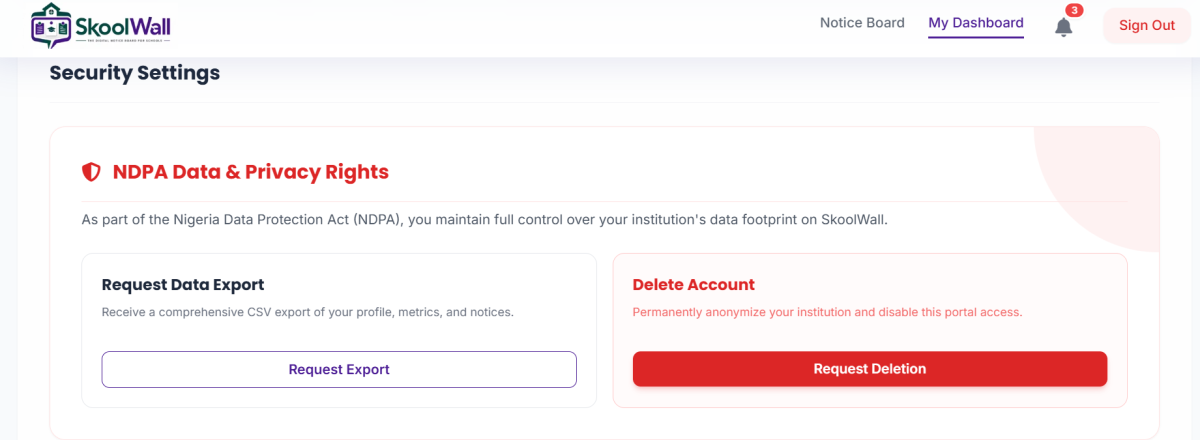
The Request Account Deletion feature allows institution administrators to permanently close their Skoolwall account and delete all associated data. This action is irreversible and should only be used when you are certain you no longer need the service.
⚠️ CRITICAL WARNING:
Account deletion is permanent and cannot be undone. All data will be permanently erased and cannot be recovered.
Target Users: School administrators with full deletion authority
When to Use:
- Institution is permanently closing
- Migrating to a different platform permanently
- No longer need digital notice board services
- Compliance with data deletion requests
When NOT to Use:
- Temporary closure or break periods
- Testing or exploring other options
- Minor issues that can be resolved with support
Navigation Path
Dashboard → Settings & Profile → Security Settings → Delete Account
⚠️ BEFORE YOU DELETE: Critical Pre-Deletion Checklist
YOU MUST complete these steps BEFORE requesting deletion:
- [ ] Export all data using the Request Data Export feature
- [ ] Download and verify the export file is complete
- [ ] Notify all users who access the notice board
- [ ] Inform stakeholders (staff, students, parents) about the change
- [ ] Remove any external links pointing to your notice board
- [ ] Document alternative communication methods for your community
- [ ] Obtain proper authorization from school leadership
- [ ] Backup any critical information stored only in Skoolwall
Step-by-Step Guide: How to Request Account Deletion
Step 1: Export Your Data First
- MANDATORY: Follow the "How to Request Data Export" guide first
- Download and securely store your data export
- Verify the export file contains all necessary information
- Do not proceed until you have your data backup
Step 2: Access Security Settings
- Log in to your Skoolwall account
- From the main dashboard, click "Settings & Profile"
- Navigate to "Security Settings"
Step 3: Locate the Delete Account Section
- Find the "Delete Account" section (right side, pink/red background)
- Read the warning carefully: "This will permanently delete your institution and delete your entire notice board"
Step 4: Initiate Deletion Request
- Click the "Request Deletion" button (solid red button)
- A confirmation dialog will appear
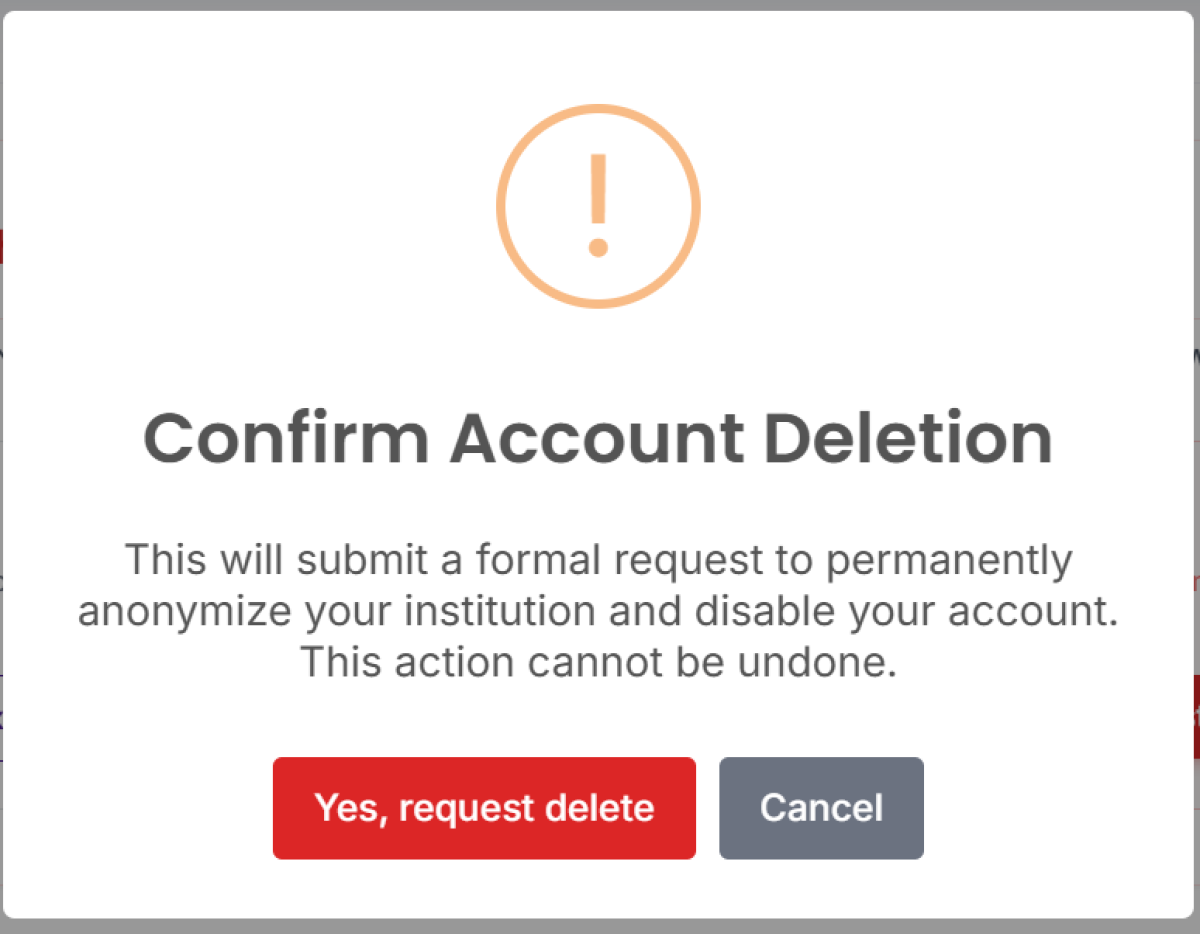
Step 5: Confirm Deletion
- Read the final warning message carefully
- You may be asked to type your institution name or "DELETE" to confirm
- Click "Confirm Deletion" or equivalent button
- You may receive a verification email
Step 6: Email Verification
- Check your registered email inbox
- Click the verification link to confirm deletion
- This is a final safety measure to prevent accidental deletion
Step 7: Account Removal
- Once the Skoolwall admin receive the request, your account will be permanently deleted
- All data will be erased from Skoolwall servers
- You will be logged out automatically
- Your institution's notice board will be taken offline immediately
What Happens When You Delete Your Account?
Immediate Effects:
❌ Your institution's notice board is taken offline
❌ All users lose access to the account, including your subscribers.
❌ Public-facing notices are removed from display
❌ Login credentials become invalid
Permanent Data Deletion:
❌ All notices and content are permanently erased
❌ Institution profile and settings are deleted
❌ User accounts and permissions are removed
❌ Activity logs and history are wiped
❌ Media files and attachments are deleted
Cannot Be Recovered:
❌ No backup or recovery option exists
❌ Skoolwall support cannot restore deleted accounts
❌ Data cannot be retrieved after deletion
Important Information
|
Detail |
Information |
|---|---|
|
Processing Time |
Immediate to 24 hours |
|
Reversibility |
NONE – Deletion is permanent |
|
Data Recovery |
IMPOSSIBLE – No recovery option |
|
Re-registration |
Institution name may become available for new registration |
|
Cost |
Free (no cancellation fees) |
|
Refunds |
Contact billing support for subscription refund policies |
Tips & Best Practices
- Export First, Always: Never delete without exporting data first
- Double-Check Authorization: Ensure you have proper authority to delete the account
- Communicate Widely: Inform all stakeholders well in advance
- Consider Alternatives: Contact support to discuss temporary suspension or downgrade options
- Document the Process: Keep records of deletion requests for compliance purposes
- Plan Transition: Have alternative communication methods ready before deletion
Common Mistakes
❌ Deleting without data export – You will lose all data permanently
❌ Not notifying users – Stakeholders are caught off-guard when access stops
❌ Accidental clicks – The red button is easy to click by mistake; be careful
❌ Assuming it's reversible – There is NO undo; deletion is final
❌ Not checking authorization – Only authorized administrators should delete accounts
Troubleshooting
|
Problem |
Solution |
|---|---|
|
Request Deletion button not working |
Verify admin privileges; refresh page; try different browser |
|
Didn't receive confirmation email |
Check spam folder; verify email address; contact support immediately |
|
Want to cancel deletion request |
Contact Skoolwall support IMMEDIATELY (only possible if not yet processed) |
|
Accidentally clicked delete |
Do NOT confirm in the dialog; close the window; contact support if already confirmed |
|
Need to recover deleted account |
NOT POSSIBLE – Deletion is permanent; no recovery available |
|
Deleted but still receiving emails |
Unsubscribe from marketing emails separately; may take 24-48 hours to process |
Alternatives to Account Deletion
Before permanently deleting, consider these options:
✅ Temporary Suspension – Contact support to pause your account
✅ Archive Content – Export data and stop using without deleting
✅ Transfer Ownership – Assign account to another administrator
✅ Resolve Issues – Contact support to fix problems instead of deleting
Related Pages / Next Steps
- How to Request Data Export – Export your data before deletion
- Contact Support – Discuss alternatives to deletion
- User Management – Remove individual users instead of entire account
Legal & Compliance Notes
NDPA Compliance (Nigeria Data Protection Act)
- Account deletion fulfills the "right to erasure" under NDPA
- Data is permanently removed from all Skoolwall systems
- Deletion is logged for compliance audit purposes
- Some metadata may be retained for legal/regulatory requirements (anonymized)
Data Retention After Deletion
- User Data: Completely erased within 24 hours
- Backup Systems: Purged within 30 days (standard backup rotation)
- No Personal Data: No personally identifiable information is retained after deletion
Need Help?
Before Deleting:
- Live Chat: Available in dashboard
After Accidental Deletion:
- Contact support immediately (recovery may not be possible, but report the issue)
Documentation Version: 1.0
Last Updated: July 2026
Platform: Skoolwall Digital Notice Board System
Compliance: NDPA (Nigeria Data Protection Act)